
EIDVault
An iOS app built for digital forensic analysts, incident responders, and Windows sysadmins working with Windows Event Logs (EVTX). It covers Windows Event IDs (EIDs) across a plethora of EVTX log channels, enriched with MITRE ATT&CK® mapping, detection rules (Sigma, KQL, Splunk) and additional investigation context. The app includes an on-device AI tab, Scenarios, powered by on-device Apple Foundation Models, that presents the user with relevant EIDs based on a provided prompt or attack scenario.
Overview
EIDVault is a quick-reference for EIDs, built for digital forensic analysts, incident responders, and Windows sysadmins working with EVTX logs. Every event in the catalog is enriched with MITRE ATT&CK mappings, detection rules, the XML fields that matter, and related events you’d want to pull into a timeline. The app was designed to help an EID lookup answer “what’s this event” and “what do I do with it” in the same view.
The dataset ships inside the app, so everything works offline - can be used in a coffee shop (avoiding sketchy public Wi-Fi) or even a SCIF. There’s no login, no account, and no network call required to look up an event.
Compatibility
EIDVault runs on iPhone and iPad (iOS / iPadOS 26 and later), and on Apple Silicon Macs as an iPad app. Scenarios requires Apple Intelligence to be supported and enabled, with some features requiring iOS 26.5 or later.
Scenarios
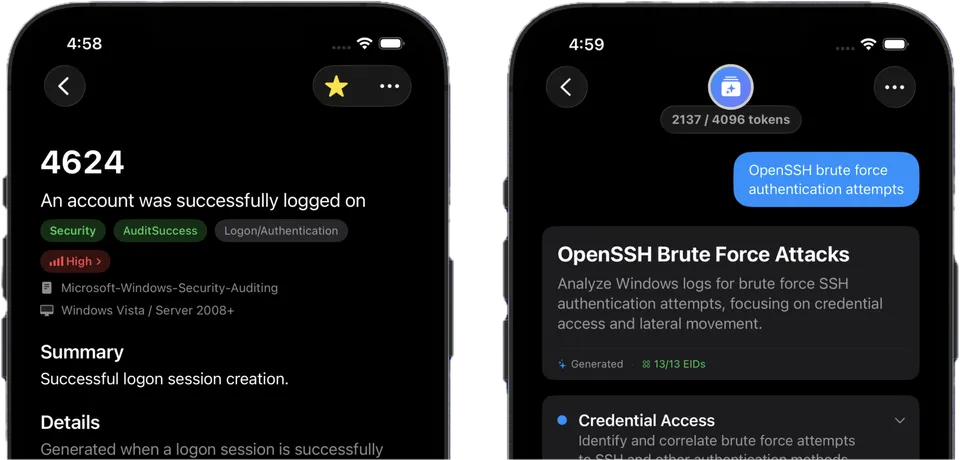
EIDVault includes an experimental tab called Scenarios that turns a natural language description of what you’re seeing into a curated set of relevant EIDs. It’s powered by Apple Foundation Models and runs entirely on-device - never sending prompts or context to the internet.
You can also ask follow-up questions to refine suggestions or pull in more detail. The model’s reasoning is grounded in the app’s structured EID dataset of channels, tags, ATT&CK mappings, and related events - not pulled from the open web. A separate bundled dataset of attack tools, techniques, and DFIR definitions is injected into prompts automatically, which allows the model to reason about cyber-related terminology it wasn’t specifically trained on.
Screenshots
Features
Search & Browse
Browse by log channel or search across every EID, tag, and ATT&CK tactic.
Scenarios
An on-device AI tab powered by Apple Foundation Models. Describe what you're seeing and on-device intelligence surfaces relevant EIDs. No network calls or prompts leaving the device.
MITRE Mapping
Every applicable EID is tagged with ATT&CK techniques and tactics, including direct links to MITRE's knowledge base.
Detection Rules
Inline Sigma, KQL, and Splunk rules where they exist - copy & paste as a starting point, then tune.
Key Fields
The XML fields that matter for each event, with their XPaths, so you know what to grep for in raw EVTX.
Related Events
Every entry cross-references the other EIDs you'd want to pull into a timeline.
Plain Text / Markdown Exports
Export full EIDs or specific fields to plain text or markdown.
Fully Offline
The dataset is bundled all within the app. Works completely offline.
Who it’s for
EIDVault is for analysts and practitioners who live within EVTX. If you’ve ever caught yourself googling whether Logon Type 10 is the interactive one or the remote one, or wondering which Security 4624 fields actually matter, this is built for you. It’s also useful for newer analysts as a way to internalize event structure and potential relationships without having to chase down 10+ different references for every EID. Scenarios can even be used to suggest a starting set of EIDs when you don’t yet know what you’re looking at.
Data is open source
The app’s source code is private, but the underlying EID dataset is public at github.com/zerber0s/windows-eid-data. Every entry conforms to a published JSON schema. If you spot an error, want a new event added, or have a better investigation pivot for an EID, open an issue or PR. Updates to the data ship without requiring a corresponding app release, creating flexibility in a world of ever-changing cybersecurity.
Each entry in the dataset feeds multiple views inside the app. Click through the tabs below to see how a single JSON record powers the details, MITRE mapping, key fields, and detection rules:
An account was successfully logged on
Generated when a logon session is created on a system. The event is recorded on the machine being accessed and includes the account name, logon type, source network address, and authentication package used.